


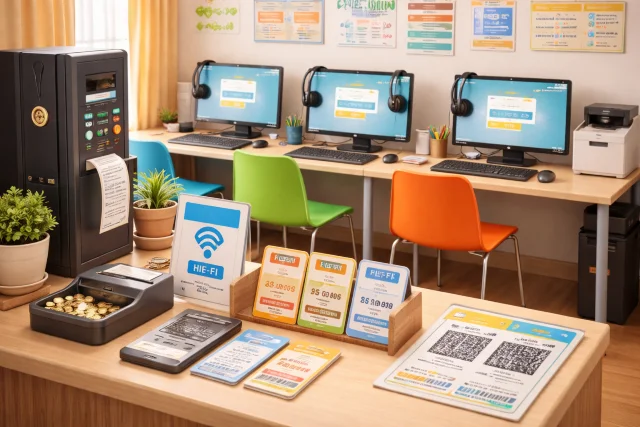
If you have ever relied on a pay as you go internet booth, a shared computer kiosk, or a community access point to get online, you already understand the basic idea behind pasonet. In many places, especially where home broadband is expensive or unreliable, pasonet style setups make the internet feel simple again: you pay only for the time or access you need, you get a working device in front of you, and you get things done.
This article breaks down pasonet in practical terms. You will learn the key features people expect, how to set it up for a small shop, school, or community space, and how to fix the common issues that frustrate users the most. Along the way, we will also connect pasonet to the bigger picture of internet access and why shared, affordable connectivity still matters.
What is pasonet?
In everyday usage, pasonet is commonly described as a pay per use internet access setup. Think coin operated or prepaid kiosk style internet where people can rent computer time, log in for a session, and then log out when finished. In some communities, it became a practical bridge for students, job seekers, and families who needed online access without paying for full monthly service.
That might sound old school, but shared access models are still relevant. Global connectivity keeps improving, yet large gaps remain between people who are online and people who are not, and the quality and affordability of access can vary hugely. ITU reporting highlights that internet use continues to rise while disparities persist across income levels and geographies.
So, when someone searches “pasonet features” today, they are often looking for one of two things:
- A modern way to run a pay per use access point (small business or community setup)
- A practical guide to using one (end user setup, login habits, safety, and troubleshooting)
This guide covers both, with a strong focus on real world reliability.
Core pasonet features people actually care about
A good pasonet setup is not about fancy design. It is about repeatable sessions, predictable costs, and a smooth experience for people who may be in a hurry. Here are the features that matter most.
1) Pay per use sessions that are easy to understand
Most people expect time based sessions (for example, 15 minutes, 30 minutes, 1 hour). Others prefer data based sessions, especially when bandwidth is limited.
The best pasonet implementations do two things well:
- They make pricing obvious before the session starts
- They show time remaining clearly during the session
When pricing is unclear, users assume they are being overcharged, even if they are not.
2) Simple login and logout flow
Session based access lives or dies by the login flow. Users want to sit down, pay, sign in, and start browsing quickly. They also want a clean logout that actually ends the session and clears personal data.
A reliable pasonet flow includes:
- A short login step (PIN, ticket code, QR code, or operator enabled session)
- Auto logout when time expires
- Automatic browser cleanup and user profile reset
3) Multi device options
Classic pasonet refers to computer kiosks, but modern expectations include:
- Desktop PCs for typing, printing, school work, and forms
- WiFi access for phones (especially if users bring their own device)
This matters because, globally, billions of people access the internet through smartphones. GSMA reporting notes that by the end of 2023, around 4.3 billion people were using their own smartphone to access mobile internet.
A smart pasonet operator does not fight that trend. They support it by offering WiFi sessions alongside PC sessions.
4) Safety and privacy basics built in
Shared computers can be risky if the setup is sloppy. You do not need enterprise level security, but you do need basic protections, such as:
- Separate user sessions (no shared Windows user for everyone)
- Auto deletion of downloads after logout (or forced storage to a temporary folder)
- Browser reset between users (cookies, history, cache)
- DNS filtering or safe browsing controls for public spaces
5) Admin controls and reporting
If you operate pasonet as a service, you need to track what is happening without hovering over every device.
Useful admin features include:
- Remote restart and shutdown
- Session time tracking and sales totals
- Basic device health checks (disk space, CPU temperature alerts, network status)
- User queue management (optional, but helpful during peak hours)
6) Add on services that increase revenue
Many pasonet kiosks stay profitable by bundling small services that people still need:
- Printing and scanning
- Photocopy support
- Document formatting help (CVs, school projects, forms)
- Basic photo editing for IDs
Even if your goal is community access rather than profit, these services can help cover maintenance costs.
pasonet setup guide for a small shop or community space
This section is written for operators: a cyber cafe owner, a school admin, a small shop, or a community group that wants to offer affordable access. You do not need expensive gear, but you do need to be intentional.
Step 1: Decide your pasonet model
Choose one of these models based on your audience:
Model A: PC only
Best for: students, job seekers, people filling forms
Pros: easy to manage, consistent experience
Cons: higher hardware maintenance, limited seating
Model B: WiFi only
Best for: phone users, short sessions, low space environments
Pros: cheap to scale, less hardware damage
Cons: harder to enforce fairness and speed per user
Model C: Hybrid (recommended)
Best for: mixed communities
Pros: widest usefulness, best revenue options
Cons: requires more planning and monitoring
Step 2: Hardware checklist that balances cost and reliability
You can start lean, but do not go too cheap on the parts that keep uptime stable.
Recommended baseline
- Router with good heat handling and stable firmware
- Uninterruptible power supply for router and main switch (power cuts destroy sessions)
- 1 to 5 desktop PCs (depending on space)
- Headphones that are easy to clean (optional)
- Printer and scanner (optional, but often worth it)
If your local area has frequent power dips, add voltage protection. The goal is to reduce random reboots and corrupted systems.
Step 3: Network setup that does not collapse under load
Most pasonet complaints come down to bad network planning. Here is a simple approach that works:
- Put pasonet devices on a separate guest network or VLAN
- Enable bandwidth limits per device (so one person cannot consume everything)
- Use a reliable DNS service and block obvious malicious domains (public PCs attract junk)
A lot of users will be watching video by default. If your connection is limited, set policies early:
- Limit streaming resolution on public PCs
- Prioritize browsing, forms, and messaging traffic
Step 4: Session control options (pick what fits your reality)
There are three common ways to manage sessions:
Operator managed
A staff member starts and ends sessions manually.
Best when: very small setup, high trust, low complexity.
Voucher or code based
Users buy a code that unlocks time.
Best when: medium traffic, you want speed and clear accounting.
Captive portal for WiFi
Users connect to WiFi, land on a login page, then enter a voucher.
Best when: BYOD is common.
No matter which you choose, keep one principle: the session must end cleanly and predictably.
Step 5: Lock down public PCs the right way
Public PCs should feel normal to users while being hard to break accidentally.
Practical settings:
- Create a standard user account for sessions (no admin permissions)
- Use kiosk style policies (disable system settings access)
- Auto restore to a clean state on reboot (many operators schedule daily reboots)
- Configure browsers to clear data on exit
Also, choose one browser and keep it updated. Too many browsers means too many things to patch.
Step 6: Pricing that people trust
People accept pay per use pricing when it feels fair and transparent.
A simple pricing structure might look like:
- 15 minutes: quick check in
- 30 minutes: messaging and short tasks
- 60 minutes: school work, job applications, longer sessions
If you offer printing, keep it simple too:
- Per page black and white
- Per page color
- Scan per file
Consistency builds trust faster than “special deals” that change every week.
Common pasonet issues and how to fix them
Below are the most common problems, what causes them, and the fixes that work in real setups.
Quick troubleshooting table
| Problem | Likely cause | Fix that usually works |
|---|---|---|
| Slow internet for everyone | Router overload, no bandwidth control, ISP congestion | Reboot router, set per user limits, schedule updates at night |
| One PC is slow, others fine | Disk full, too many startup apps, malware | Clear disk, disable startup apps, run security scan, reimage if needed |
| Users still logged in to accounts | Browser not clearing data, logout not enforced | Enable clear on exit, force browser reset scripts, separate profiles |
| WiFi connects but no internet | Captive portal stuck, DNS issues | Restart portal service, change DNS, verify upstream link |
| Printing fails randomly | Driver glitches, printer sleep mode, low ink | Update drivers, disable deep sleep, keep spare ink and paper |
| Voucher codes “invalid” | Time sync issues, expired vouchers, backend error | Sync system time, review voucher rules, regenerate vouchers |
Issue 1: “pasonet is too slow”
First, confirm what “slow” means. Users might mean:
- Websites take long to open
- Videos buffer
- Downloads crawl
- The PC itself is lagging
Run this simple test:
- Open a speed test on one device and compare at least twice
- Check router CPU and memory usage (many routers expose this)
- Check if one user is downloading or streaming heavily
If your line is limited, you cannot “fix” physics, but you can manage expectations and fairness. Per user bandwidth caps and a hybrid model (PC plus WiFi) often make a huge difference.
Issue 2: Sessions do not end cleanly
This is a trust killer. If a user finishes a session and the next person can see their Facebook, Gmail, or files, you will lose customers and possibly cause harm.
Fix checklist:
- Force logout at timer end
- Clear browser data automatically
- Disable saving passwords
- Auto delete downloads folder or redirect downloads to a temp folder that resets
If you do not have automation tools, a crude but effective approach is scheduled reboots plus a daily “reset image” of the system.
Issue 3: Users cannot access certain sites
This is often caused by DNS filtering, ISP blocks, or browser issues. Ask:
- Is it one device or all devices?
- Is it one site or many sites?
- Does it work on mobile data but not on pasonet?
Fix steps:
- Switch DNS to a reliable public DNS provider
- Update browser certificates by updating the OS and browser
- Check captive portal rules for WiFi sessions
Issue 4: Malware and unwanted popups
Public machines attract adware. It is not personal, it is just the environment.
What works:
- Standard user accounts (no admin)
- Browser extensions that block malicious ads (where allowed)
- Regular patching
- Weekly or monthly reimaging if you have repeated infections
If a PC gets infected often, it is usually cheaper to wipe and restore than to keep “cleaning” it.
Issue 5: Voucher system complaints
Users complain when:
- Codes expire too quickly
- Codes fail after payment
- Time “vanishes” due to system time mismatch
The hidden culprit is often time sync. If your system clock is off, vouchers can break.
Fix it by:
- Enabling automatic time sync on the server or admin machine
- Printing voucher rules clearly (validity window, non refundable time, etc.)
- Keeping a manual override for staff to credit time when errors occur
Issue 6: Power cuts and session loss
In many regions, this is the hardest problem.
Practical mitigations:
- Put your router and core switch on a UPS
- Configure PCs to auto recover and reopen the session screen on boot
- Offer a simple “power cut policy” (for example, staff can add 10 minutes credit if the outage happened during a paid session)
The goal is to show fairness, even when the problem is outside your control.
Real world scenarios: how pasonet fits different needs
Scenario A: Students completing assignments
Students often need:
- Reliable browsing
- Document editing
- Printing
A hybrid pasonet works best. PCs handle documents and printing, WiFi handles quick research. This is especially important because while many people have phones, not everyone can comfortably write and format long assignments on a small screen.
Scenario B: Job seekers applying online
Job portals, email verification, and file uploads are common pain points.
Make it smoother by:
- Keeping a “Job Applications” folder template on the desktop that resets daily
- Offering scanning services for documents
- Ensuring browsers can upload PDFs without plugin issues
Scenario C: Community access for essential services
Government forms, school portals, and health appointments increasingly rely on digital access. Public access points still matter because even where internet usage is growing, gaps in affordability, quality, and digital skills remain.
A pasonet operator who helps users navigate these tasks responsibly becomes part of the local support system, not just a shop.
FAQs about pasonet
Is pasonet still relevant if most people have smartphones?
Yes, because smartphones do not solve everything. Many tasks still work better on a PC (documents, printing, long forms), and not everyone has stable data all the time. GSMA reporting shows mobile internet use is widespread, but that does not remove barriers like cost, device capability, or network quality for everyone.
Is pasonet safe to use for email or banking?
It can be safe enough for basic use if the operator runs clean session resets and keeps systems updated. Still, users should avoid saving passwords, always log out, and use two factor authentication. Operators should enforce browser cleanup and limited permissions.
How can operators prevent privacy issues?
By designing the setup so privacy is automatic:
- Separate sessions
- Forced logout
- Browser reset
- Restricted permissions
- Regular reboots or system restore routines
What is the biggest mistake new operators make?
Trying to run pasonet without bandwidth controls and without a clear session reset process. People forgive slow speed more easily than they forgive privacy leaks.
Conclusion
A good pasonet experience is built on simple promises: fair pricing, clean sessions, and reliable access. When you get the basics right, pasonet becomes more than a kiosk. It becomes a practical bridge for learning, work, and connection in places where personal devices or full time subscriptions are not always enough.
In places like the Philippines, pasonet style access became part of everyday digital life because it met people where they were, with affordability and convenience that felt human.