


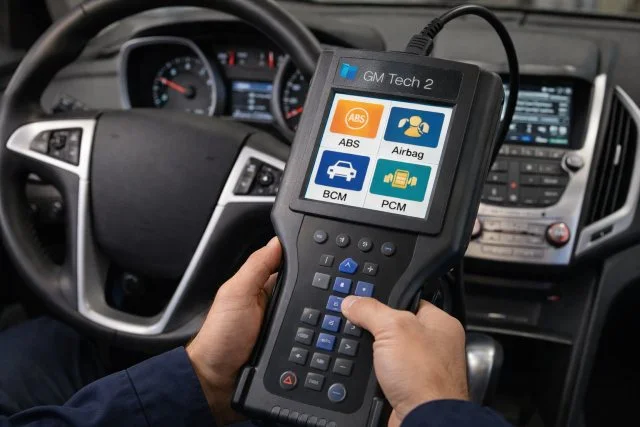
If you have worked on GM vehicles for any length of time, you learn quickly that the toughest problems are rarely “one code, one part.” A no crank might be theft deterrent, not the starter. A soft brake pedal after repairs might be air trapped inside the ABS hydraulic unit, not “bad bleeding.” An airbag light can be a loose connector under a seat, or it can point to a real safety fault you do not want to guess at.
- Why the GM Tech 2 Scanner is different from a basic OBD2 reader
- Quick module overview: ABS, SRS, BCM, PCM
- GM Tech 2 Scanner for ABS diagnostics: best uses that save time
- GM Tech 2 Scanner for airbag/SRS diagnostics: best uses for safe repairs
- GM Tech 2 Scanner for BCM diagnostics: best uses for “mystery electrical” issues
- GM Tech 2 Scanner for PCM diagnostics: best uses for driveability
- Compatibility and communication: why Tech2-era tools still matter
- Programming and setup: what to understand before you rely on it
- Conclusion
That is exactly where the GM Tech 2 Scanner earns its reputation. It is designed for deeper GM module access than most basic OBD2 tools, which often focus mainly on generic powertrain codes. GM’s own diagnostic support information shows that Tech2 and Tech2Win support many 2007 and earlier GM vehicles, and later years increasingly shift toward GDS2 depending on the model.
In this article, you will learn the best real-world uses of the GM Tech 2 Scanner for four systems techs deal with constantly: ABS, airbag/SRS, BCM, and PCM. The goal is simple: help you diagnose faster, avoid needless parts swapping, and verify repairs correctly.
Why the GM Tech 2 Scanner is different from a basic OBD2 reader
Most generic OBD2 readers are great for quick checks, but they usually have limits:
- they focus mostly on engine and emissions related codes
- they may not access every GM module
- they often lack bi-directional controls and special routines
The GM Tech 2 Scanner is built around broader module communication and deeper manufacturer-level data on Tech2-era vehicles. It is also used in programming workflows when paired with GM’s Service Programming System, which is PC-based. GM’s SPS guide describes SPS as a PC application used to reprogram vehicle modules, using Tech 2 (Tech 2 Flash) or another approved interface as a pass-thru device.
The short version:
- basic scanners read codes
- the GM Tech 2 Scanner helps you diagnose systems
Quick module overview: ABS, SRS, BCM, PCM
Here is what each module is responsible for, in plain language.
- ABS: monitors wheel speed and modulates brake pressure to help prevent wheel lock-up.
- Airbag/SRS: monitors and controls airbags, pretensioners, crash sensors, and readiness.
- BCM: manages body functions like locks, lights, key fobs, security logic, and network messaging.
- PCM: controls engine management and often transmission behavior, plus emissions and driveability logic.
When a fault happens, the best approach is:
- scan the correct module
- verify the data behind the code
- run functional tests where available
- confirm the fix before clearing codes
GM Tech 2 Scanner for ABS diagnostics: best uses that save time
ABS is one of the most valuable areas for a factory-level tool because it is not just about reading a code. It is about confirming what the module is seeing and doing.
1) Pulling ABS-specific codes and data lists
Many generic scanners cannot fully access ABS or provide limited info. With the GM Tech 2 Scanner, you can retrieve ABS module DTCs and then check live data like wheel speeds, brake switch status, and other parameters (depending on platform). That is how you avoid replacing parts based on a vague description.
2) Live wheel speed comparison to catch dropouts
A classic symptom is “ABS activates at low speed for no reason.” Watching live wheel speeds often reveals the truth.
Real-world example:
- at 8 to 12 mph, one wheel speed sensor drops momentarily while the others stay steady
- that points to the sensor signal, tone ring, wiring, connector, or bearing play
- it does not automatically mean the ABS module is bad
3) ABS automated bleed routine after brake system repairs
This is one of the most practical reasons techs use the GM Tech 2 Scanner. After certain brake repairs, air can get trapped inside the ABS modulator. Normal bleeding can leave a soft pedal because it does not cycle the ABS pump and solenoids.
Multiple repair references explain that scan tool ABS bleeding works by activating the pump and valves to move trapped air out of the module, allowing proper bleeding.
A technician-friendly workflow:
- bleed the brakes normally first
- run the ABS automated bleed function
- bleed normally again to finish
4) Functional tests to isolate pump and valve problems
ABS pump or solenoid faults can be electrical, not mechanical. Where supported, bi-directional tests let you command components and confirm operation. That helps you separate:
- pump motor failure vs relay/wiring issues
- valve issues vs module driver issues
- voltage drop problems vs component faults
GM Tech 2 Scanner for airbag/SRS diagnostics: best uses for safe repairs
Airbag faults are not the place for “let’s clear it and see if it comes back.” The warning light indicates a fault the system is monitoring.
Safety sources explain that if the airbag/SRS warning light stays on, the system may not function properly in a crash and should be inspected and repaired.
1) Reading SRS module codes that generic scanners miss
Many basic scanners cannot access the SRS module. The GM Tech 2 Scanner can retrieve SRS module codes and guide you to the fault zone.
Common causes include:
- pretensioner circuit resistance faults
- clockspring circuit faults
- seat occupancy system issues
- impact sensor or communication problems
- low voltage history codes
Once you know which circuit is complaining, your diagnosis becomes focused.
2) Viewing data lists for seat sensors and system status
Some SRS issues are simple but hidden: connectors under seats, corrosion, or intermittent resistance. Data lists can show live status such as passenger airbag enable/disable state and switch inputs (platform dependent). That is often enough to prove whether the issue is in the seat system, steering wheel circuit, or a sensor path.
3) Clearing codes after verification, not before
A reliable method:
- read and record codes
- fix the root cause using service info
- re-scan and confirm the fault is resolved
- clear codes and verify the light stays off after key cycles
This prevents comebacks and avoids wiping diagnostic clues too early.
GM Tech 2 Scanner for BCM diagnostics: best uses for “mystery electrical” issues
BCM related problems can look random because the BCM is involved in so many functions.
Typical complaints:
- locks and windows acting strange
- headlights or interior lights flickering
- intermittent no crank with security messages
- key fob not working
- warning chimes and power mode issues
1) Diagnosing no crank and theft deterrent symptoms
Many “starter issues” are actually authorization issues. With BCM data, you can often verify:
- ignition switch input states
- key recognition or security related status (platform dependent)
- whether the BCM is commanding a starter relay output
- whether the crank request is being received
This quickly tells you if you are dealing with a mechanical starter circuit problem or an electronic permission problem.
2) Output controls for locks, lights, and relays
Where supported, commanding outputs is one of the fastest ways to isolate faults.
Example:
- command door locks using the GM Tech 2 Scanner
- if the locks move, the actuators and wiring are likely OK
- if they do not, test power, grounds, wiring, and actuator integrity
It turns “maybe” into “prove it.”
3) Catching faulty inputs that imitate bad parts
A bad door ajar input can cause interior lights to stay on. A brake switch reading wrong can affect multiple systems. Live BCM input data is how you find those “lying” inputs without replacing good parts.
GM Tech 2 Scanner for PCM diagnostics: best uses for driveability
When the vehicle runs poorly, the PCM is the module that holds the story: fuel trim behavior, sensor rationality, misfire detection, and many functional tests.
1) Better live data to diagnose lean, misfire, and sensor faults
Instead of just reading a code like P0171, use data to understand why it set:
- short and long term fuel trims
- MAF readings
- oxygen sensor activity
- coolant temperature accuracy
- throttle position and commanded states
- misfire counters where supported
This is how you avoid replacing parts “because the code said so.”
2) Bi-directional tests that confirm component function
Depending on platform, you can command certain functions like EVAP purge or cooling fan activation and observe whether the system responds correctly. That saves time because you can confirm component and circuit behavior without guessing.
3) Relearn functions after certain repairs
On many Tech2-era GM vehicles, procedures like crankshaft variation relearn may be required after specific repairs to ensure accurate misfire detection and correct operation. The point is not to do every routine. The point is to do the required one for that repair.
Compatibility and communication: why Tech2-era tools still matter
Not all GM vehicles use the same diagnostic tool family. GM’s diagnostic support information highlights the split where Tech2/Tech2Win covers many 2007 and earlier vehicles, and later models trend toward GDS2, with exceptions.
This matters in real shops because:
- many vehicles on the road are still in that coverage range
- older protocols and modules can be easier to access with the correct era tool
- the GM Tech 2 Scanner often communicates more smoothly on those platforms
Programming and setup: what to understand before you rely on it
Many people assume the GM Tech 2 Scanner can program modules by itself. In most cases, module programming is done through a PC-based workflow using GM’s Service Programming System. GM’s SPS guide explains this process and notes using Tech 2 (Tech 2 Flash) or another interface as a pass-thru device.
The practical takeaway:
- use the GM Tech 2 Scanner for diagnosis and special functions
- use proper programming systems and subscriptions when module setup or software updates are required
Conclusion
The GM Tech 2 Scanner is most valuable when you use it as a diagnostic tool, not just a code reader. For ABS, it helps you confirm wheel speed signals, isolate pump and valve issues, and run automated bleed routines that cycle the ABS hydraulic unit to remove trapped air. For airbag/SRS, it gives access to the right module codes and live status so repairs can be verified safely, which is critical because an SRS warning light can indicate the system may not deploy correctly in a crash. For BCM, it brings clarity to confusing electrical complaints through input and output testing. For PCM, it provides deeper live data and targeted tests that make driveability diagnostics faster and more accurate.
When used correctly, the GM Tech 2 Scanner helps you diagnose with proof, confirm your repairs, and cut down on comebacks, which is the real win.
In the bigger picture, this is what good vehicle diagnostics looks like: scan the right module, interpret real data, test deliberately, and verify the fix.